
LocalGen is a practical Image Playground alternative when you want a dedicated Stable Diffusion app, model-led styles and an on-device workflow that continues offline after setup. Image Playground is the natural fit when you want Apple Intelligence integration with people from Photos, concepts, Messages or Freeform. Neither is the right choice for everyone.
The main difference is the creative workflow
Apple's current Image Playground guide describes a concept-based experience. You can combine up to seven elements, including themes, expressions, places, a text description, a person from your photo library or another photo. Apple lists Animation, Illustration and Sketch as Apple Intelligence styles, plus optional ChatGPT styles. Image Playground also appears inside apps such as Messages and Freeform.
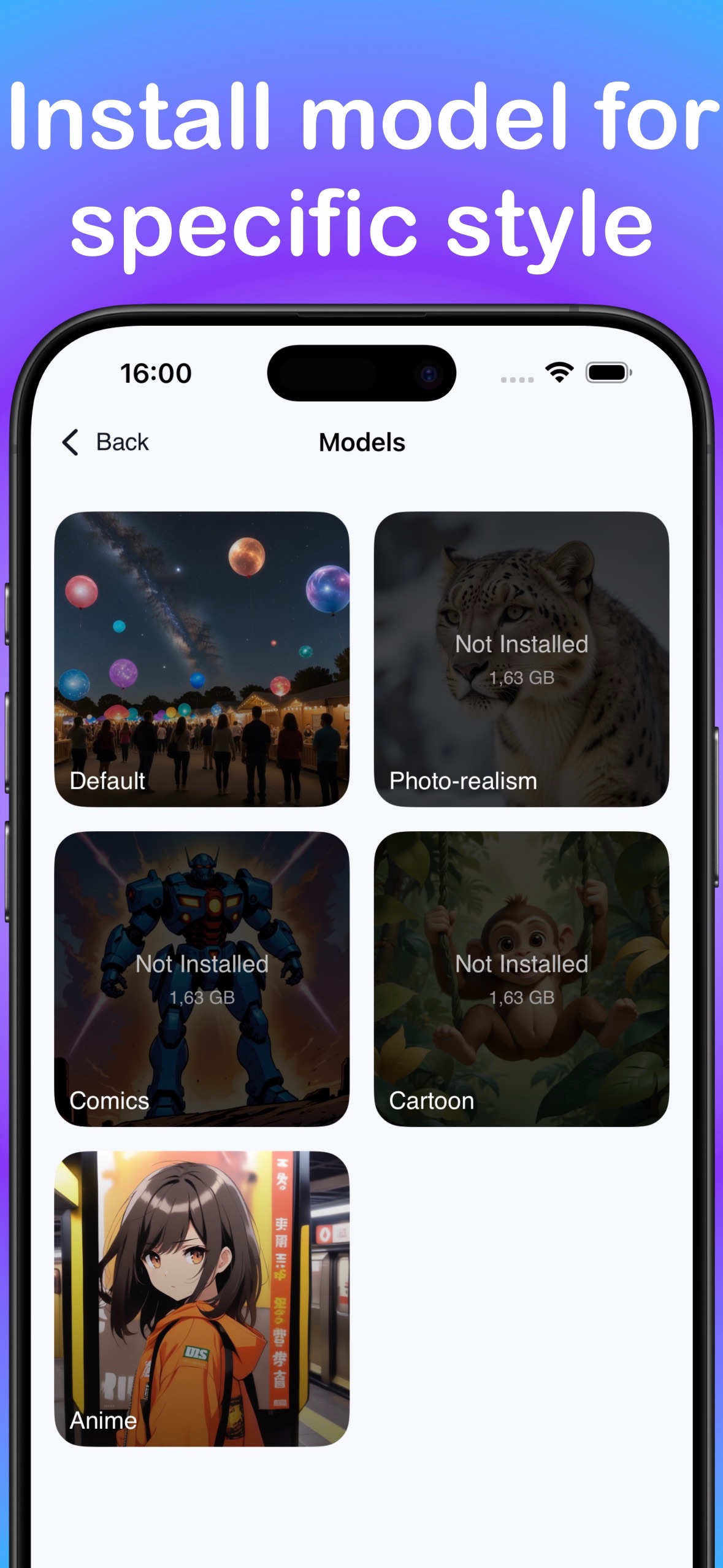
LocalGen is a dedicated AI image studio. Its App Store screenshots show a prompt field, a model choice and a generated-image gallery. The current model library includes Anime, Cartoon, Realism, Illustration and Painting choices. That makes the app suited to a repeatable prompt → model → generate → refine loop.
For the current Apple details, see Apple's Image Playground user guide and Apple Intelligence requirements.
| Decision point | Image Playground | LocalGen |
|---|---|---|
| Core approach | Combine concepts, descriptions, people and photos | Write a prompt, choose an on-device model and generate |
| Verified styles | Animation, Illustration, Sketch; optional ChatGPT styles | Anime, Cartoon, Realism, Illustration and Painting models |
| App integration | Built into Apple experiences including Messages and Freeform | Dedicated app with save-to-Photos and sharing |
| Current iPhone requirement | iPhone 15 Pro models, or iPhone 16 models and later | Technical panel says A12-class; developer recommends A14-class / iPhone 12 or newer |
| Offline claim | Depends on the selected Apple Intelligence or optional ChatGPT workflow | On-device generation works offline after app and model setup |
Check device eligibility before comparing features
Apple currently lists iPhone 15 Pro models and iPhone 16 models or later for Apple Intelligence. For iPad, it lists iPad mini with A17 Pro and iPad models with M1 or later. Apple also requires a supported software version, 7 GB of device storage for Apple Intelligence, and matching supported device and Siri languages. Feature availability can vary by platform, language and region.
LocalGen has a different compatibility story. Apple's LocalGen technical panel says iOS or iPadOS 18 and an A12 Bionic chip or later, while the developer-written description recommends A14-class hardware, iPhone 12 or newer and newer iPads. Treat the App Store's offer-to-download decision as installation eligibility and the A14 recommendation as the safer generation threshold. The LocalGen compatibility guide explains this conflict in detail.
Understand where each request can go
For LocalGen's on-device mode, the app listing and first-party privacy text say prompts, source images and generated images are processed locally. They can still leave the device when you deliberately share or sync them, attach something to a support message, or choose a separate remote feature. The App Store privacy label also discloses analytics and diagnostic categories, so “local creative processing” is more accurate than “the app never connects.”
Apple says many Apple Intelligence models run on-device. Its current Image Playground guide also offers ChatGPT styles and explicitly says that, when the extension is used, the request, attachments and limited associated data are sent to ChatGPT. If the data path matters, choose the mode intentionally in either app.
Which one fits your task?
Choose Image Playground when…
- You want to build an image from Apple-provided concepts or a named person in Photos.
- You value direct creation inside Messages, Freeform and other supported Apple apps.
- Your device supports Apple Intelligence and your preferred language and region expose the features you need.
Try LocalGen when…
- You want a dedicated prompt-first Stable Diffusion workflow.
- You want to choose among downloadable Anime, Cartoon, Realism, Illustration and Painting models.
- You want on-device generation that continues without internet after the required setup.
- You prefer no account, cloud render queue or per-image token for supported local generation.
How to try the LocalGen workflow
- Install while connected. Download LocalGen from the App Store and leave enough free space for the 2.8 GB app plus the model you plan to use.
- Choose and download a model. Select an available model that matches the intended look, such as Anime, Realism or Illustration. Model setup needs connectivity.
- Write one clear prompt. Name the subject, setting, composition, visual style, lighting and mood. Start with the essential scene rather than a long list of conflicting ideas.
- Generate on-device. Start the generation, review the result and decide which part of the prompt needs the most improvement.
- Refine one variable. Change the composition, light, environment or model one at a time so you can see what produced the difference.
- Save or share deliberately. Keep the chosen image in Photos or use the share control when you want it to leave the local workflow.
LocalGen is free to download with optional Pro purchases. Install a model before testing offline generation.
Frequently asked questions
Is LocalGen an alternative to Apple Image Playground?
Yes. LocalGen is a dedicated Stable Diffusion image app with prompt-based creation, downloadable on-device models and verified Anime, Cartoon, Realism, Illustration and Painting choices. It is an alternative workflow, not a claim that one app is universally better.
Does LocalGen work on iPhones that do not support Image Playground?
Potentially, but check the live App Store on the exact device. Apple currently requires iPhone 15 Pro models or iPhone 16 models and later for Apple Intelligence. LocalGen's technical listing mentions A12-class eligibility while its developer description recommends A14-class hardware and iPhone 12 or newer.
Can I use Image Playground and LocalGen without internet?
LocalGen's on-device generation works offline after the app and required model are downloaded. Apple says Apple Intelligence downloads on-device models, but Image Playground can also use optional ChatGPT styles that send the request and attachments to ChatGPT; check the selected workflow rather than assuming every mode is offline.